1 / 7
1 van 7 afbeeldingen
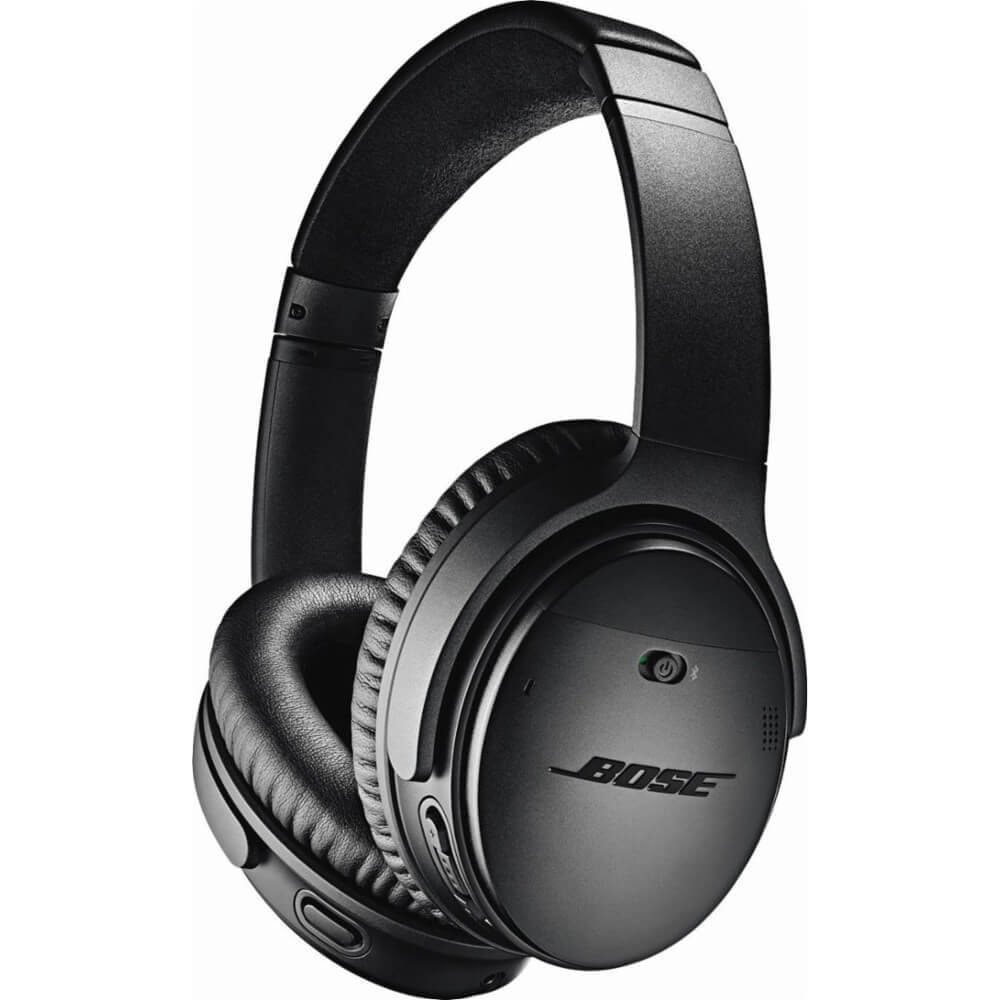
Supra-Aural Bose QuietComfort 35 II Wireless Bluetooth Headphones with Built-in Microphone for Voice Control via Alexa, Black
€ 221,99
Op voorraad
Productranking
Samenvatting: FIT bij je behoeften, expert- & influencerreviews, ingrediënten
Categorie Rang
Nog niet gerangschikt
FIT-score
Beantwoord de quiz om je FIT-score te zien
Reviews
Professionele & influencerreviews
11 Reviews
Ingrediënten
Niet van toepassing op dit product
Aanbiedingen & vergelijking
Vergelijk prijzen en vind de beste aanbieding
1 aanbiedingen·1 op voorraad·Beste : € 221,99

Gecontroleerd 10 dagen geleden · Prijzen kunnen variëren
Pikkizy kan een commissie ontvangen op aankopen via deze winkellinks. De prijzen blijven voor jou hetzelfde. Meer info
Beschikbaar als tweedehands
Deze advertenties zijn afkomstig van platforms van derden. Pikkizy is niet verantwoordelijk voor transacties.
Beschrijving
du produit How does Bose manage to further improve its high-performance noise cancelling headphones? Now, the QuietComfort 35 II Noise Cancelling Wireless Headphones lets you adjust the level of noise reduction.
Simply press the new Action button to take full advantage of high-performance noise reduction technology and isolate yourself completely or partially from the outside world. You choose the level corresponding to your environment.
So get started, immerse yourself in your music, or into silence. The QC35 II headphones offer the same performance and technology you'd expect from Bose – volume-optimized EQ for true-to-life sound regardless of volume and dual microphone system with noise reduction for clear phone calls even in noisy environments.
The built-in microphone allows you to access your phone's default virtual assistant, for example Siri. Simply hold down the multifunction key and use your voice to control your music and more. Plus, NFC pairing, Bluetooth and voice prompts free you from wires and guide you through every step of the way.
Premium materials such as ultra-soft Alcantara and PU leather provide comfortable wearing for optimal music listening all day long. You can also download the Bose Connect app for even more features. It allows you to customize your headphones or headphones, share your music with another compatible Bose Bluetooth headset, manage Bluetooth connections, and access upcoming software updates.
You can even adjust the noise reduction level directly from the app. Up to 20 hours of wireless music thanks to the rechargeable lithium-ion battery (up to 40 hours in wired mode) for whole days of listening to music, whether on the plane, on the train or even studying.
For NFC-enabled phones, simply turn on the headset by sliding the three-position switch over the middle one, then move the back side of your phone closer to the front of the right earbud at the location of the engraved NFC logo and follow the prompt to accept the connection.
If your phone is not NFC compatible, first turn on the headset by placing the three-position switch on the middle one. Then, slide the three-position switch to the Bluetooth icon until the Bluetooth light flashes blue or a voice message gives you additional instructions.
Then follow the instructions in the Bluetooth menu of your smartphone to connect the headset. Once the connection is established, the Bluetooth light will turn white. Manufacturer Details 0033-806-230-000 Contenu du coffret Earphone Carrying Case, User Manual, Detachable Cable
Supra-Aural Bose QuietComfort 35 II Wireless Bluetooth Headphones with Built-in Microphone for Voice Control via Alexa, Black
Voordelen
- volumizing
Prijshistorie
Prijsverloop en daalmeldingen
Vragen & antwoorden
Klantbeoordelingen
Laden...
CO₂-voetafdruk
Geschatte CO₂-uitstoot van dit product
Binnenkort beschikbaar
Niet precies wat je zoekt?
Beantwoord een paar snelle vragen en we vinden het perfecte product voor jou.